
















How the commercial and long-form visual effects artist uses the award-winning plugin to tackle planar tracking, rotoscoping, and compositing.
Jeff Kyle is a Flame artist and Mocha Pro enthusiast who currently works at Assembly (NYC) on a wide variety of projects from commercials for the likes of Hershey’s, Advil, and Morgan Stanley to episodics including The Last Of Us (HBO), Mrs. Davis (Peacock), What We Do in the Shadows (FX), and The Gilded Age (HBO).
He’s also involved in the Flame Beta program, an active contributor (turned tutorial creator) in the Logik Flame community, co-host on the weekly YouTube show Logik Live, and an official tutorial creator for the Autodesk Flame Learning Channel.
What type of VFX tasks do you typically tackle as a Flame artist?
Any Flame artist will tell you that it sure does vary! Commercial finishing is already a box of chocolates, but now that I’m at a company that also does long-form VFX work, it really could be anything on any day of the week. A few weeks back, we were compositing driving shots on a green screen for episodic. Last week, we were removing logos on life vests and fishing boats for a commercial.
Beauty work encompasses a lot of what we do, although recently, it’s been a lot of cleanup — logo removal so no one gets sued, sky replacements for when the weather wasn’t cooperating the day of the shoot, removing things that would make the shot look better. In one recent job, we covered up a mountainous background with some trees that they had the foresight to shoot while they were on location. It’s almost impossible to pinpoint any one cleanup task that takes the cake because it changes with every job. Otherwise, phone and screen comps are other ones that come up a lot in the kinds of commercials we do. And in my book, that variety really does keep everything interesting and fun.
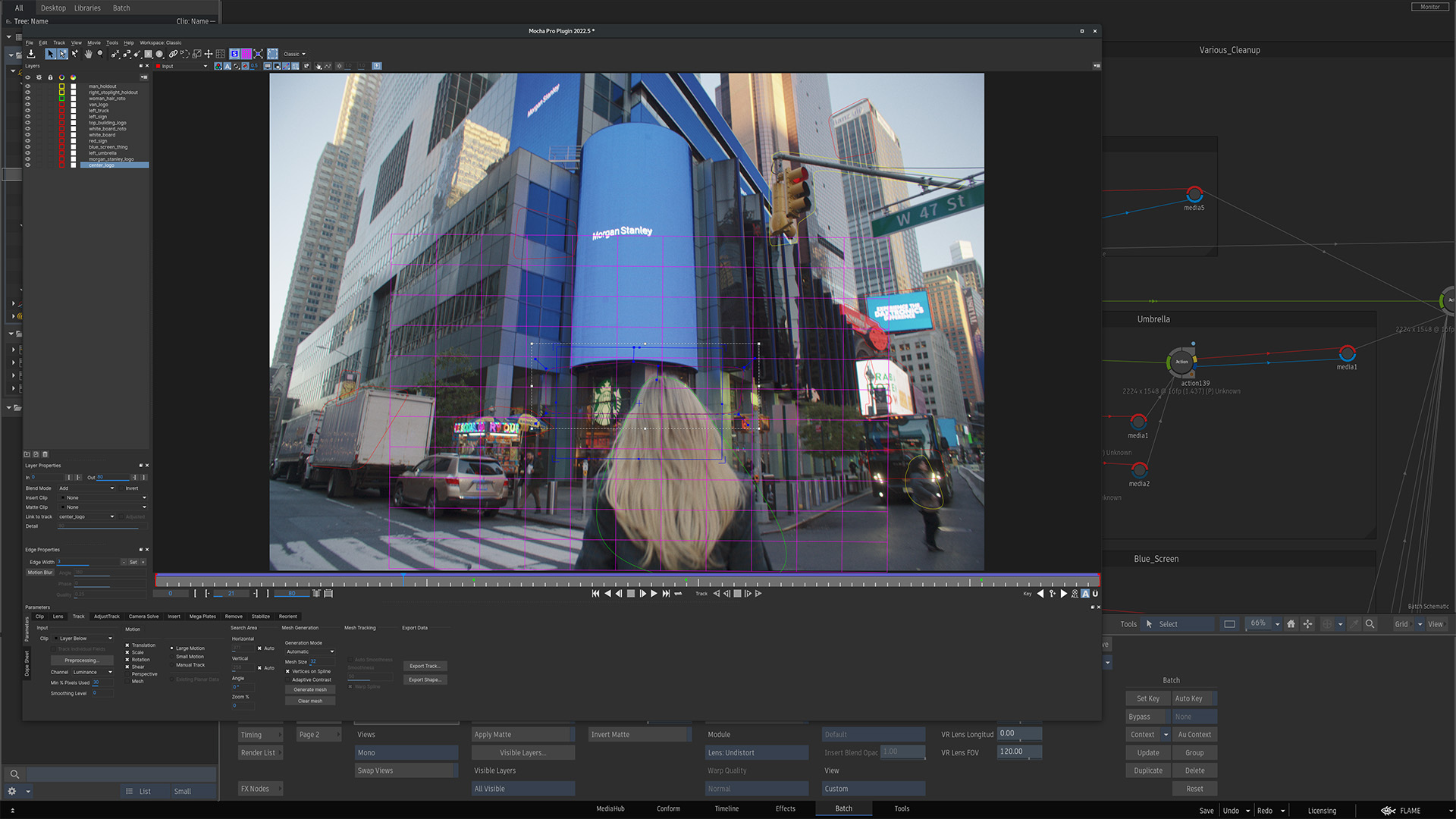 Using Mocha Pro planar tracking on a Morgan Stanley commercial
How did you first discover Mocha Pro? How long have you been using it?
If I go ALL the way back, I remember Adobe CS4 was my first foray into After Effects back in 2008, and I saw that Mocha AE was included as a package deal. I had no idea how to use it, and I might have clicked it by accident once or twice, but that was it. Fast forward to 2014 as a Flame assistant: Mocha Pro quickly turned into one of the programs I was using on a daily basis. The role of a Flame assistant is different wherever you go, but at Nice Shoes at that time, Flame assistants weren’t using much Flame but instead were using tools like Mocha Pro to help Flame artists with their shots. I was fortunate enough to have been working with a Flame artist who saw the value of Mocha Pro and was a big fan of the program himself. He taught me everything that he had learned and turned me into both a Mocha Pro evangelist and a pretty good user of the software. It’s because of this that I can’t seem to stay away, and now that I’m working on my own shots for myself, as soon as I can see that the roto or tracking is past the “super simple” threshold, I default to Mocha Pro without thinking twice.
How has having access to Mocha Pro in Flame changed the way you work?
It was truly a game-changer when OFX came into play. When I began using it professionally in 2014, the only Flame option was to use the standalone version on a separate machine since Flame was Linux-based.
My mentor would tell me stories of how if I wasn’t available to help him, he would export the shot and then walk across the room to the iMac and do the tracking over there. When he was done, he would walk back over to his Flame and continue working. This is coupled with the fact that when using the standalone version in conjunction with Flame, you would have to export the shot to be worked on, navigate to the exported file, inevitably run into permissions issues with said file, ensure the Mocha Pro project was set up correctly with the frame offset that Flame was expecting, export the tracking data or roto shape and try to avoid additional permissions issues when sending it back to Flame. Every step of the way introduced more room for error.
OFX is better in just about every way. To say it’s a time saver is truly an understatement. No more walking over to another machine (or, in the case of cloud computing, spinning up a new VM just to run Mocha Pro). No more exporting the shot. No more permissions issues. It was a good day when the OFX plugin came to Flame.
What Mocha Pro feature do you use most — and why?
I wouldn’t call myself a power-user of Mocha Pro since I tend to stick to the two or three features that I know and love, but if I had to pick one, it has to be the planar tracker. When I’m color grading in Flame, I need to get through a high volume of shots in a short time. In those cases, it doesn’t make sense to go into Mocha Pro just to create some grading shapes, and it’s a no-brainer to use Flame’s tracking and roto tools.
But when I’m in a compositing environment, and I have to decide whether to use Flame’s tracker or Mocha’s tracker, experience has me choosing Mocha Pro virtually every time. Even if I think Flame can probably get the job done, I’ve done enough tests comparing Flame’s tracker and Mocha’s tracker to know that there’s some special secret sauce inside of Mocha Pro that gets me to where I need to go quicker than if I had used Flame.
What is the most difficult shot you’ve ever tracked with Mocha Pro?
This is especially difficult because I tend to work through difficult shots and then block them out of my memory forever, but after some contemplation, I’ve remembered a few of them. My hardest track + roto was when I had to roto 5 full-body-dancing people for a Wawa commercial. It was all day, every day, for a week straight. Wow, that was a lot.
The hardest regular track was a cleanup shot for a pharmaceutical commercial whose name I can’t remember, but it was a sailboat with a sizable logo on the sail. The sail was being hoisted up, and I had to remove the logo from the sail. There was quite a bit of texture in the sail fabric. It was a very windy day. The sail was billowing in the wind. My first step was to try to use Flame’s motion vectors, but I just couldn’t get them to work, no matter how hard I tried. It was at that point that I learned how to use Mocha Pro’s PowerMesh Tracker. My first track wasn’t perfect due to the nature of the shot, but thanks to the ability to slightly manually modify the mesh, I tweaked it to get it close enough. Then, I used a combination of warping and stabilization to get it over the line. It looked absolutely fantastic!
What are your top 3 reasons why Flame artists should incorporate Mocha Pro into their pipeline?
Well, if it isn’t obvious enough by now, my number one reason is that Mocha Pro is clearly the superior tracking solution when compared to Flame’s planar tracker (or any app’s planar tracker, for that matter).
Second, it’s quicker than you think to get in, do the track, and get the data into Flame, especially once you’ve got the steps down pat. Like any new workflow, it takes time to master. My slightly biased opinion is that it’s worth the effort to learn. Finally, there is a lot of support out there to grow and learn.
There are years and years of great Mocha Pro tutorials on the Boris FX site that are truly timeless. And for Flame specifics, there are a handful out there, and I’ve made a quick Mocha-Flame tutorial for something called Logik Fest back in 2020 that helps get people up to speed with how to use tracking data in Flame. I was supposed to churn out a new Mocha Flame tutorial back in 2022, but I’m a little late. Maybe this right here is the inspiration I need to make it a reality. Otherwise, I’ve answered countless questions for Flame artists over the years in the Logik community — on the forum and on the discord. I don’t plan to stop any time soon. Stop by and ask away!
What’s your best pro tip for artists new to Mocha Pro?
It is really hard to whittle it down to just ONE tip. I HAVE to give you one tip for each category.
Workflow Tip: Pay special attention to your layers. It’s super simple, but having a mastery of the order of your shapes and when to turn that gear icon on and off when you’re done tracking or need to continue tracking is easy to overlook, but great for saving your work and speeding things up.
Speed Tip: It’s my biased opinion as a gamer that keyboard shortcuts are king. Get a great handle on the keyboard shortcuts that manipulate the time bar. Frame forward, frame backward, track forward, track backward, jump to the next keyframe, and jump to the previous keyframe. Navigating that time bar is 50% of the time sink of using Mocha Pro. If you’re dragging your mouse down to it all the time, it’s a lot of time wasted.
Tutorial Tip: There’s so much to learn, and that learning goes on forever. Be humble and be ready to learn all the time. There’s a lot to learn from the traditional tutorial creators on the Boris FX site, but there are also some gems from the artists just showing their process of working through a shot. Keep an open mind and be on the lookout for efficiencies and workflows that make sense for you to incorporate.
What’s your favorite project you’ve ever worked on — and why?
My favorite projects are small to medium-sized short film or feature film grading jobs that expand into something just a bit more. The time saving of keeping the grade, compositing, and even finishing in one app and with one person is gratifyingly efficient. It’s even more satisfying to have a client notice something in the color session and be able to say, “Yes, I can absolutely fix that.” I graded a short film called F^¢k 'Em R!ght B@¢k that was shot wonderfully, had an excellent schedule where I didn’t feel rushed, and had just a few cleanup and compositing tasks sprinkled in. The “most difficult” comp on that job was a very satisfyingly simple screen comp where I needed to modify an existing screen UI. As usual, Mocha Pro ate that right up. The client was more than happy with everything. It ended up being one of my favorite jobs of all time.
Do you use any other Boris FX products?
I’m a big fan of Sapphire — two of the three places I’ve worked had it, and I ended up falling in love with S_Glint and S_Ultraglow. I also worked with a few editors who used S_BlurMotion every few shots, so that’s grown on me as a fun transition. I’m not doing super creative look development exploration work enough, so I don’t have a great handle on the creative and unique nodes in the Sapphire toolkit, but they are important.
Learn more about Mocha Pro and download a free trial.
New to Mocha? Watch our FREE Mocha Essential training series.
